Showing posts with label customer engagement service. Show all posts

Thursday, January 19, 2017

What Are Browser Push Notifications

Before getting onto browser push notifications, it is important to understand the term PUSH NOTIFICATIONS. A “push notification” is a message that pops up on a device (particularly a mobile device). They usually originate from the user, unlike pull notifications where a client has to request the required information from the server. It allows notifying the user of new messages or events even when the user is not engaged in your application.

Website/ Browser Push Notifications are quite similar to mobile app push notifications, the only difference being that they can be accessed on any device (tablet, mobile, computer etc.) and particularly work on websites.

Push Notifications

They are real-time instant clickable messages that are sent by the server (website) to the client (subscriber).

1.       COMMUNICATION CHANNELS

Websites use a lot of communication channels like SMS, EMAILS, SOCIAL MEDIA, MOBILE APP PUSH NOTIFICATIONS and Web Push Notifications. All of this is done in order grow and engage their traffic. Every communication channel has its own benefit. E-mail is one of the most widely used communication channels. Social media i.e. FACEBOOK, TWITTER has a bigger reach but its engagement is fairly low when compared to e-mail. 


Browser Push Notifications
.                                                                                                                                                                                                                                                                                              
For instance, Setting up a mail on your iPad allows you to send and receive mail messages. When an email is received, a certain number with a red background appears on the mail icon. Through this number you can see that how many unread messages you have in your inbox

2.    SUBSCRIPTION

When a guest lands onto your website, they get a pop up message asking whether they would like to subscribe to push notifications or not. If the user subscribes to your notification, they are added to the subscriber’s list within your CMS.


Once the guest becomes the subscriber, you can send them push notifications from your website. The user will get the notifications as long as the browser is running in the background.


Browser Push Notifications Integration Guide


      3.    PUSH NOTIFICATION COPY

In strict sense of term, copy refers to the text which is to be set in type for any form of communication. Copy plays a crucial role in the implementation and effectiveness of push notifications. The copy should never be too long or descriptive as it would drive away the visitors. The preferred word limit for a push notification copy is 40-120 words. It should follow certain principles:


     Simple language
     Clarity of expression
     Avoid Jargons and Clichés
     Use an action oriented message (call now, buy now etc)
     Make use of character limit
     Focus on the benefits
     Mention the USP
     Hit the right target


Example: IBM’s phrase in the 80’s:- “NO one ever got fired for buying IBM.” It is one of the most powerful marketing phrases. Another powerful tagline that we get to hear today is by M&M: “Melts in your mouth and not in your hands”


      4.    TIMING AND FREQUENCY

Timing is obligatory. This is one common mistake that is bound to commit by a number of websites. Website should keep in mind that each time zone receives the message at a relevant time. Also, one should never send push notifications too frequently. As website push notification is a new technology, the appropriate frequency is not mentioned. For this, one needs to review the click rates, opt-outs, bounce rates after every push notification and calculate the frequency accordingly.

How To Use Browser Push Notifications For A Travel Website


Push notifications is a direct way of communicating with the users. They help to communicate with the audience in real time and at a very personalized level.  If properly used, this new technology can get incredible results in the form of increased number of clicks.


Tuesday, November 15, 2016

How To Use Browser Push Notifications For A Travel Website


Earlier, customers used to book travel tickets manually by going to the ticket office. However, the foundation of internet has changed the way of bookings. Now people can plan their trip just with the click of a mouse. It takes couple of minutes to book your favourite hotel or flight unlike the traditional way where one had to stand in long queues. All the person needs is an internet connection.
There are a number of travel websites that are prevalent today. Everyone is in a rush to expand their business by having a large number of users. One way of doing the same is by using Browser Push Notifications. Many websites have started using this modern technology.

Makemytrip is a travel website through which users can plan their entire trip from booking a flight, bus etc to booking a hotel. Several packages are displayed on their website and the cost varies according to the number of days and the quality of hotels and transportation. Makemytrip often makes use of browser push notifications. It sends notifications to its users regarding  new packages with discounted rates in order to attract the customers.
For example:- Mega holiday in Manali at only 5,500 INR.


Browser Push  Notification


In case a person has booked a flight via makemytrip, it sends a push notification on discounted hotel rates of the same travel destination just after the flight.

Another incredible example of browser push for a travel website is Yatra.com. It is one of India’s leading travel website with over 60,000 hotels in India and 5,00,000 across the world. Through browser push notifications, it sends various sale offers that are prevalent during festive seasons. Whenever the air fares drop, they send a push notification to its users regarding the same.
For example:- Get 20% off on every flight booking.
If you have a booking for a certain date, the website would send a push notification prior to your travel as a reminder. 


Also, if someone has booked a one way flight (eg:- Delhi to Mumbai), a personalized offer on the return route is sent to him/her after 2 to 3 days via browser push notifications.
For example:- Book a flight to Delhi at 20% off.

Booking.com is a luxury tour operator in India which provides leisure and business travellers with the most cost-effective deals. Through this website hotels can be booked according to everyone’s pocket. It has hotels ranging from 3 star to 5 star. It continuously informs the users regarding new deals and offer via push notifications.
For example:- Treat yourself XYZ, it’s deals day!

Push Notification
In order to get more signups, the site might also offer discounts to the users.

Trivago.in is a hotel manager website which was launched recently in India. It offers solutions to hoteliers to manage their online presence. It’s mobile application (which is available for both IOS and android users) has a calendar-based homepage and an additional feature that displays accommodation within close proximity to your current location. It has heavily relied on television advertising to promote its website and along with this, it has now started making use of push notifications to promote several hoteliers. The website has data of the users searching for a hotel. If someone searched for hotels in Mumbai, a push notification is sent to him/her regarding relevant offers for the same destination the next day.

A multipurpose website Groupon has a portal named near buy travel that enables customers and local merchants to engage with each other. The application continuously makes use of browser push notifications. Anyone who reaches its website gets a notification saying “near buy travel would like to send push notifications”. Whoever accepts the invitation starts getting notifications regarding premier travel destinations and offers attached with them.
For example:- You've got one more reason to visit Goa. Click to know more.


Browser push is now offering a variety of benefits to both the travelers (subscribers) and travel websites. It is one feature which nobody is planning to ignore these days. It has led to increased conversions and has built customer loyalty. 


Monday, November 14, 2016

Browser Push Notification

How To Get Higher Views And Clicks Via Browser Push Notifications


 push notifications


A limited number of views or decreasing number of clicks can often be disturbing.

For instance: You have sent a notification to 100 subscribers, out of which only 50 subscribers viewed the notification (50% view rate) and only 10 clicked them (10% click rate). This not a very good performance in terms of views and clicks and one may be finding ways to increase the same.

A browser push notification, which is a modern technology, can help in increasing your views and clicks instantly. There are five simple steps with which this can be done:

1.    Timing the notifications

Timing your notifications is of prior importance. Sending notifications to the people at an appropriate time (when they are online) would result in a higher view rate.  According to a survey, it has been identified that sending the notifications during peak hours especially afternoon can have incredible results in terms of clicks and views. However, there may be exceptions where you may not be able to time your notifications, for instance A BREAKING.

    2.   Acuminate/ sharpen your message

Maintaining brevity in the message is a very crucial task. However, maintaining brevity doesn't mean that you can miss on the important parts of message. The message should be complete with all the required information included in it. Whatever you are trying to deliver should be very crisp and at the same time simple, short and customer centric. Use a CALL FOR ACTION like buy now, shop now, call now etc.

3.   Increased Expiration time

A higher expiration time leads to higher view rates. A notification would be shown to the user if he/she comes online on the subscribed browser before the expiration time. If the push notification is not time sensitive, stating a higher expiration time would lead in better ratings.

NOTE: In case you state a very high expiration time, there might be chances of the user getting the same notification a number of times which would lead to hazardous repercussions. Thus, a balance in the timing and frequency of the notifications should be maintained appropriately.

   4.   Tailored images for each notification

A picture is worth thousand words. Using the same image for every notification can often be dull and boring. It creates monotony and drives the users away. People are believed to be persuaded more with the help of images rather than text. Rather than including only a logo, one should include a separate image for each notification. Also, using various design principles and elements like bright colors, proper contrast, rhythm, leading image can get incredibly good results.

5.  Reciprocity of the notifications

Interacting and reciprocating is very important. A notification should be kept open until the user interacts with it. It should not disappear after a couple of minutes or seconds. Interacting would intern give a better response.

In case you are planning to increase your number of clicks and the view rate, and generate more leads through web push notification


Tuesday, November 1, 2016

Push Notification For E-commerce Website

Browser Push Notifications are real-time messages that are sent by the server (website) to the client (subscriber). They are becoming extremely popular these days especially in the e-commerce business.. Browser push notifications have evolved as one of the most popular tool which is used by a number of e-commerce companies. These instant clickable messages are accessible even if the user is not logged in and has therefore benefited a large number of e-commerce websites today.

Paytm is one of world’s largest selling businesses. It has several products which can be used by the customers. It also gives the option of paying online bills and prepaid recharge. Whenever a user orders a certain product from their website, they get push notifications regarding the order delivery. The customer is updated at every step from packaging to delivery.                                                 

For example:- Dear Tanya, your order 1109876 has been packaged.


xxxxxx.png


There are a lot of instances where users keep their carts abandoned. They tend to forget or get distracted while the checkout process and leave their carts deserted. Flipkart.com, a shopping website uses browser push notifications to engage their users and remind them of the abandoned carts. It leads to a smooth buying and checkout process.

For example:- Dear XYZ, You have 3 products remaining in your cart.
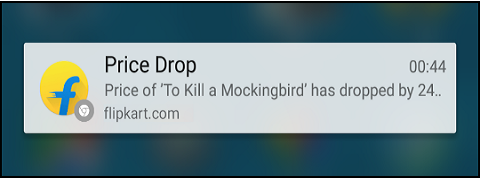
It also allows the users to subscribe for price drop notifications. Once the price of the product goes down, the subscribers are informed regarding the same.
For example:- Your favourite Apple iPhone 6 now at just 31,000 INR.


A newly formed website in India i.e shopclues.com has also been making use of browser push notifications lately. It has thousands of products ranging from apparels, home and kitchen to electronics. The website has focused highly on Personalization through web push notifications. It uses promo push which lets the users to receive information regarding latest deals and newest products.
For example:- Check out Lakme’s brand new range of lipsticks.
Also, there is a wish list that is available on the website. There are times when a product is unavailable at a particular time. If the person puts that item in the wish list, he/she gets a push notification as soon as the product is back in stock.
For example:- Dear XYZ, your favourite Calvin Klein perfume is back in stock at 20% off.


Sale offers are very much prevalent on e-commerce websites. A subscriber tends to get a push notification prior to  and during the sale. This acts as a reminder as well as a new piece of information and drives more traffic towards the website.
For example:- Snapdeal end of season sale- Flat 40 to 60% off.


Welcome notifications are also being used by a number of websites as a tool of personalisation. When a person logs on to the website, he/she gets a welcome notification.
For example:- Welcome XYZ, you were missed.


One of the latest ways of driving traffic towards the website is to provide users with an offer that they can never reject. Streetstylestore, an apparel and footwear website for women has made use of push notifications to invite more and more traffic. Whoever accepts their notifications are bound to get a certain reward. A coupon code is given, which can be redeemed at the time of payment.
For example:- Subscribe and get 40% off. Use coupon code SSS134.


To sum up, browser push notifications are essential for e-commerce websites and can be used for the following purposes:-


  • Inform about starting of a sale
  • Announce new products
  • Changes in existing products
  • Recover deserted carts
  • Get signups from the users
  • Deliver personalized and promotional offers